How to Download YouTube Videos on iPhone
By the SaveDock team · Updated
You do not need a special app to save a YouTube video on an iPhone or iPad. Safari can download files directly, and iOS stores them in the Files app. This guide walks through the whole process, from copying the link to playing the video offline.
Skip the reading?
Use the YouTube Video Downloader or the main downloader.
What you need
An iPhone or iPad running iOS 13 or newer (iPadOS 13 or newer), the Safari browser, and a link to a public YouTube video. Private videos, age-restricted videos and videos that need a login cannot be downloaded.
Make sure you have enough free storage. A 1080p video is roughly 50 to 70 MB per minute, while 720p is about half of that. You can check the estimated size next to each quality before you download.
Step by step
1. Open the YouTube app or website and tap Share, then Copy link.
2. Open Safari and go to the SaveDock home page.
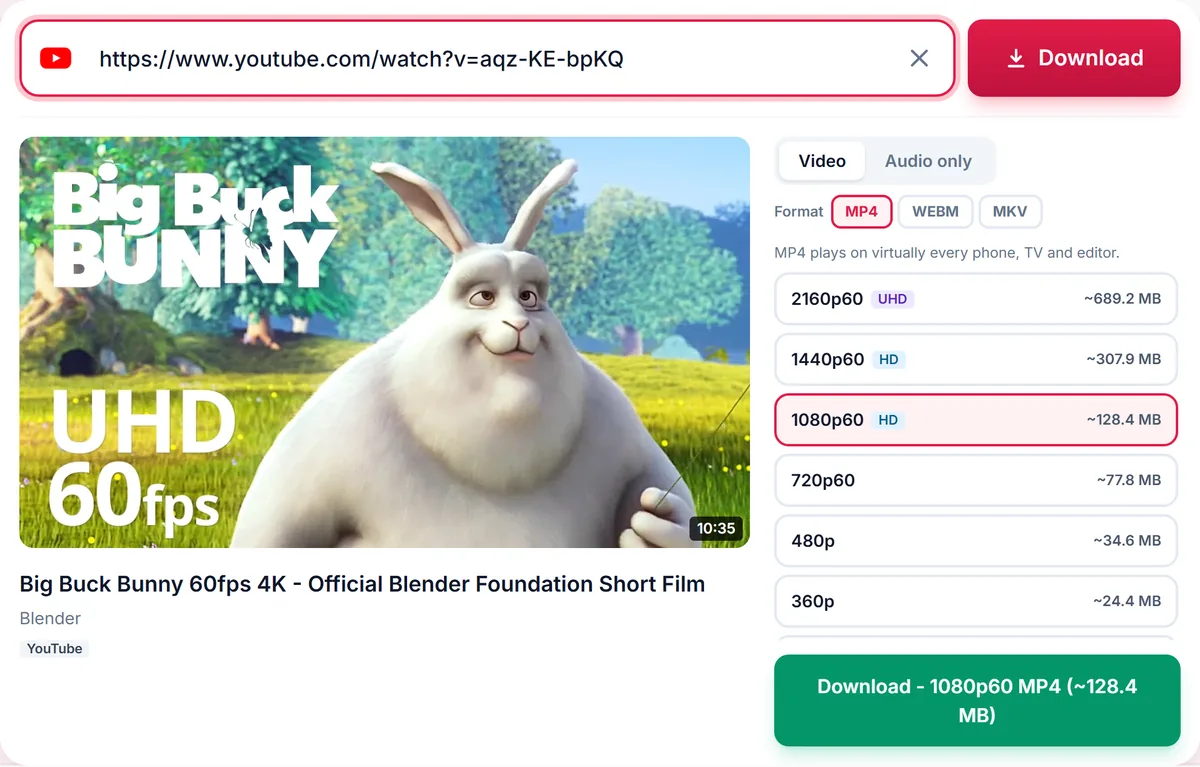
3. Paste the link into the box. The available qualities appear in a few seconds.
4. Choose MP4 (the format iPhone plays natively) and a quality such as 720p or 1080p, then tap Download.
5. When the file is ready, Safari asks whether to download it. Tap Download, then tap the small download icon in the address bar to see progress.
Where the video goes
Downloaded files are saved to the Downloads folder in the Files app. Open Files, tap Browse, then iCloud Drive or On My iPhone, and open Downloads. Tap the video to play it, or press and hold and choose Share, then Save Video to add it to your Photos library.
If you want to listen only, switch to the Audio only tab before downloading and choose M4A, which plays natively on Apple devices, or MP3 for universal compatibility.
Tips for the best result
Use MP4 on iPhone. WebM and MKV files may not play in the default player. If a 4K video is only available in a newer codec, you may get an MKV; choose 1080p MP4 instead for guaranteed playback.
Download over Wi-Fi to save mobile data, and keep Safari open until the file finishes. If the download is slow, try a lower resolution.
Common problems and quick fixes
The download button does nothing: make sure you are using Safari and that Settings, then Safari, then Downloads is set to a location you can reach, such as iCloud Drive or On My iPhone. If Safari shows a prompt, tap Download rather than Cancel.
The video plays but has no sound: this is rare with MP4 downloads from SaveDock because HD audio is merged automatically. If it happens, try another quality, or open the file in the VLC app, which plays almost every format.
The file will not open in Photos: Photos only imports formats it understands. Choose MP4 with a 1080p or lower quality. 4K files in newer codecs may play in Files but not import into Photos.
Storage is full: iPhone needs free space to receive the file. Choose a lower quality, or download audio only, which is typically a small fraction of the size of the video.
Staying safe while downloading
Never install apps that promise to download YouTube videos from the App Store outside of well-known, reviewed developers, and never enter your Google or Apple password on a downloader site. A legitimate web downloader only needs the public video link.
Be careful with pop-ups and fake download buttons on other sites. On SaveDock the only buttons that matter are Download and Save file, and nothing is installed on your phone.
When you should not download
Respect creators and licences. Download your own uploads, videos with a licence that allows it, and public-domain or Creative Commons content. For everything else, use the official Download option in YouTube Premium, which supports the creators directly.
Frequently asked questions
Can I download YouTube videos on iPhone without an app?
Yes. Safari can download the file directly and saves it to the Files app.
Why does the video not appear in Photos?
Downloads go to Files first. Open the video there, tap Share and choose Save Video to add it to Photos.
Does this work in Chrome on iPhone?
Safari is the most reliable browser for file downloads on iOS. Other browsers may work, but downloads can be blocked.
Is it legal to download YouTube videos?
Only download content you own, that is licensed for download, or that is in the public domain, and follow YouTube Terms of Service.
Keep reading
Only download content you own, that is licensed for download, or that is in the public domain. See our Terms of Service.